krepton85
Универсальный BLE-монитор присутствия на Raspberry Pi 5 для MajorDoMo (без GATT и разряда батарейки)
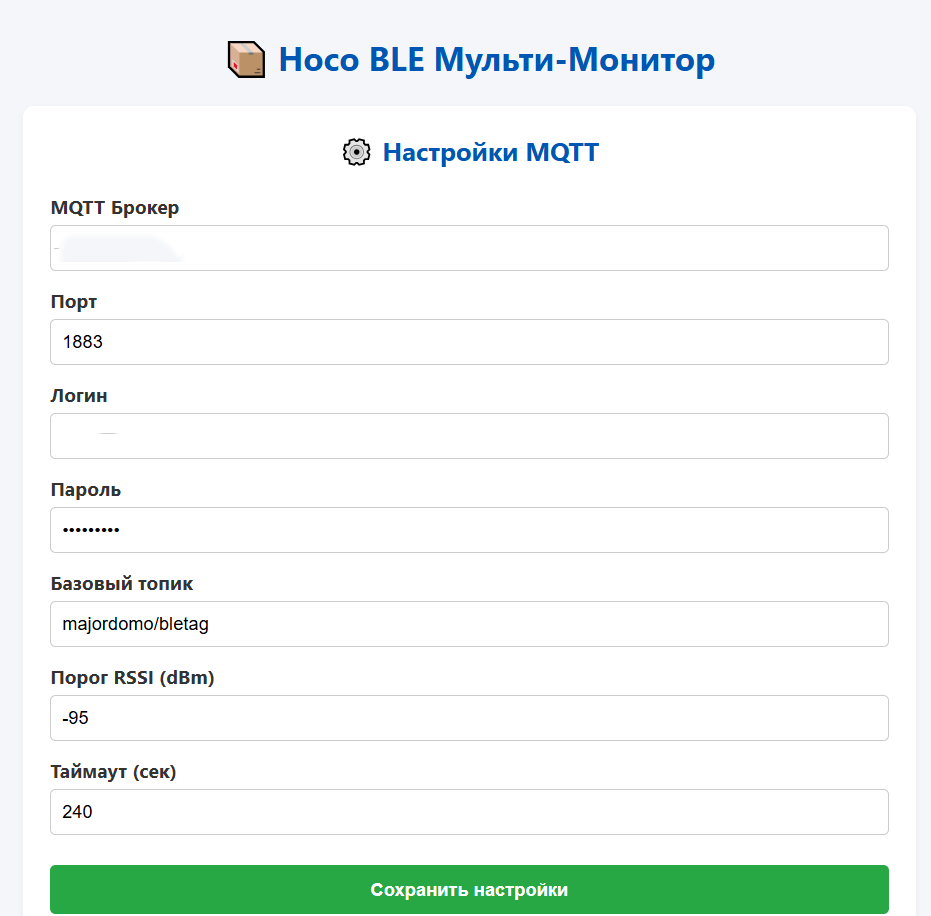
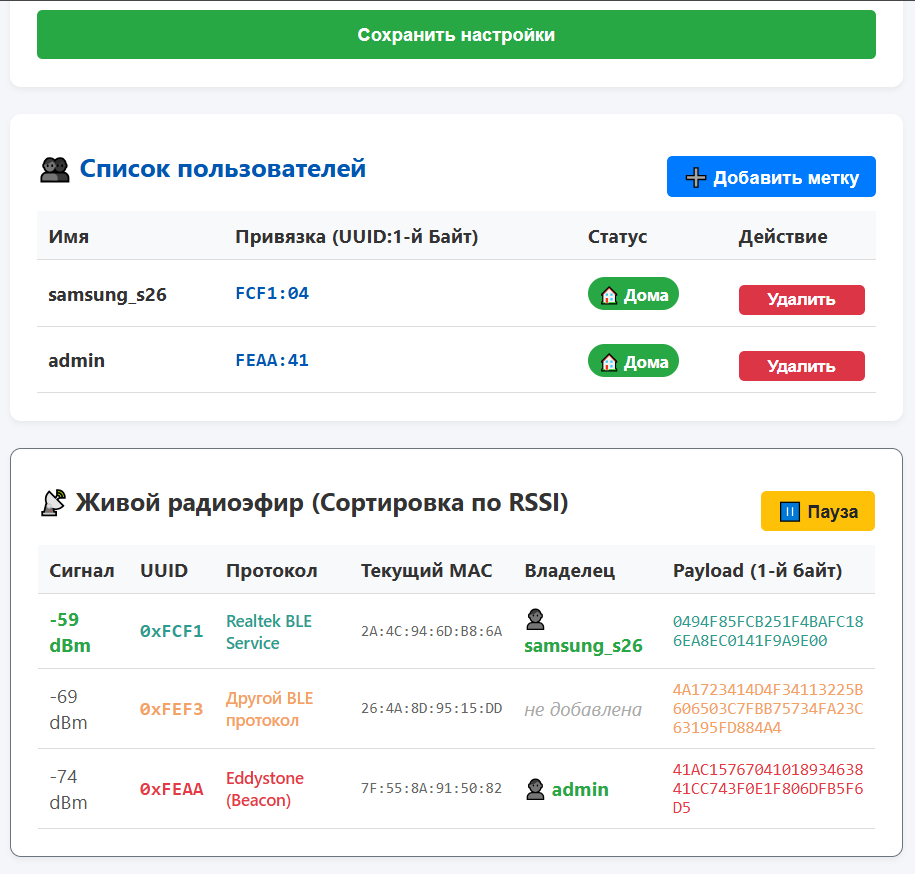
В этой статье мы создадим автономный мультипротокольный BLE-сканер с веб-интерфейсом, который работает на Raspberry Pi 5. Он пассивно слушает эфир, распознает метки по их уникальному «криптографическому отпечатку» (сочетанию Сервисного UUID и первому байту Payload), вычисляет присутствие дома по уровню сигнала (RSSI) и мгновенно отправляет статусы в MajorDoMo через MQTT.
 |
 |
 |
Большинство современных BLE-меток (Hoco, Apple AirTag, трекеры Google FMDN) в целях конфиденциальности постоянно меняют свой MAC-адрес. Из-за этого стандартные методы отслеживания через постоянный опрос имени (GATT-подключение) работают медленно, нестабильно и разряжают батарейку метки за пару недель.
В этой статье мы создадим автономный мультипротокольный BLE-сканер с веб-интерфейсом, который работает на Raspberry Pi 5. Он пассивно слушает эфир, распознает метки по их уникальному «криптографическому отпечатку» (сочетанию Сервисного UUID и первому байту Payload), вычисляет присутствие по уровню сигнала (RSSI) и мгновенно отправляет статусы в MajorDoMo через MQTT.
Ключевые фичи решения:
• 0% нагрузки на батарейку метки: Скрипт пассивно слушает эфир и не подключается к меткам.
• Скорость работы: Использование асинхронной библиотеки bleak дает моментальный отклик.
• Умный дебаг: Встроенное окно живого радиоэфира с сортировкой по силе сигнала, цветовой маркировкой протоколов и автоматической детекцией коллизий пакетов.
• Полная автономность: Работает локально на Raspberry Pi, не требуя внешнего интернета для работы интерфейса.
Шаг 1. Подготовка окружения на Raspberry Pi
Поскольку в современных версиях Raspberry Pi OS глобальная установка пакетов через pip заблокирована, мы развернем проект в изолированном виртуальном окружении (venv).
Откройте терминал Raspberry Pi и выполните команды:
# Создаем рабочую папку проекта и переходим в нее
mkdir -p /home/pi/ble-tag_fmdn/fmdn_project
cd /home/pi/ble-tag_fmdn/fmdn_project

# Создаем виртуальное окружение Python
python3 -m venv venv

# Активируем его
source venv/bin/activate

# Обновляем pip и устанавливаем необходимые библиотеки
pip install --upgrade pip
pip install bleak flask paho-mqtt
Шаг 2. Создание файлов проекта
Внутри папки /home/pi/ble-tag_fmdn/fmdn_project нам нужно создать 4 основных файла.
1-ый файл. Фоновый BLE-Сниффер (blesniffer.py)
Этот скрипт непрерывно слушает радиоэфир, фильтрует пакеты, ведет учет времени жизни меток в ОЗУ и отправляет данные в MQTT.
Создайте файл: nano ble_sniffer.py и вставьте код:
import asyncio
import json
import os
import time
from bleak import BleakScanner
import paho.mqtt.client as mqtt

CONFIG_FILE = "config.json"
pairing_active = False
raw_live_ether = {}
users_runtime_status = {}

def load_config():
    if os.path.exists(CONFIG_FILE):
        with open(CONFIG_FILE, "r", encoding="utf-8") as f:
            return json.load(f)
    return {}

config = load_config()

try:
    mqtt_client = mqtt.Client(mqtt.CallbackAPIVersion.VERSION1)
except:
    mqtt_client = mqtt.Client()

def on_message(client, userdata, msg):
    global pairing_active
    if msg.topic == "majordomo/pairing/control":
        pairing_active = (msg.payload.decode().lower() == "start")

def connect_mqtt():
    global mqtt_client, config
    config = load_config()
    if not config: return
    if config.get("mqtt_user") and config.get("mqtt_password"):
        mqtt_client.username_pw_set(config["mqtt_user"], config["mqtt_password"])
    mqtt_client.on_message = on_message
    try:
        mqtt_client.connect(config["mqtt_broker"], int(config["mqtt_port"]), 60)
        mqtt_client.subscribe("majordomo/pairing/control")
        mqtt_client.loop_start()
    except:
        pass

connect_mqtt()

def ble_callback(device, advertising_data):
    global pairing_active, config, raw_live_ether, users_runtime_status
    if not advertising_data.service_data: return

    try: config = load_config()
    except: pass

    for full_uuid, raw_payload in advertising_data.service_data.items():
        hex_payload = raw_payload.hex().upper()
        current_rssi = advertising_data.rssi

        clean_uuid = str(full_uuid).upper()
        short_uuid = clean_uuid.split("-")[0][-4:] if "-" in clean_uuid else clean_uuid[-4:]

        frame_type = hex_payload[:2] if len(hex_payload) >= 2 else ""
        if not frame_type: continue

        ether_key = f"{short_uuid}_{hex_payload}"
        raw_live_ether[ether_key] = {
            "uuid": short_uuid, "payload": hex_payload, "frame_type": frame_type,
            "mac": device.address, "rssi": current_rssi, "time": time.time()
        }

        if pairing_active and current_rssi >= -45:
            composite_payload = f"{short_uuid}:{frame_type}"
            data = {"payload": composite_payload, "mac": device.address, "rssi": current_rssi, "time": time.time()}
            mqtt_client.publish("majordomo/pairing/scan", json.dumps(data))

        if "users" in config:
            if current_rssi >= config.get("rssi_threshold", -70):
                for target_payload, user_data in config["users"].items():
                    if ":" in target_payload:
                        cfg_uuid, cfg_frame = target_payload.upper().split(":")
                        match = (short_uuid == cfg_uuid and frame_type == cfg_frame)
                    else:
                        match = (frame_type == target_payload.upper())

                    if match:
                        target_key = target_payload.upper()
                        if target_key not in users_runtime_status:
                            users_runtime_status[target_key] = {"last_seen": 0, "is_home": False}
                        users_runtime_status[target_key]["last_seen"] = time.time()

                        if not users_runtime_status[target_key]["is_home"]:
                            users_runtime_status[target_key]["is_home"] = True
                            topic = f"{config['mqtt_topic_base']}/{user_data['name']}"
                            mqtt_client.publish(topic, '{"status": "home", "value": 1}', retain=True)

async def monitor_absence():
    global config, users_runtime_status
    while True:
        await asyncio.sleep(5)
        try: config = load_config()
        except: continue
        if not config or "users" not in config: continue

        current_time = time.time()
        for target_payload, user_data in config["users"].items():
            target_key = target_payload.upper()
            if target_key in users_runtime_status and users_runtime_status[target_key]["is_home"]:
                timeout = config.get("timeout_seconds", 180)
                time_passed = current_time - users_runtime_status[target_key]["last_seen"]
                if time_passed > timeout:
                    users_runtime_status[target_key]["is_home"] = False
                    topic = f"{config['mqtt_topic_base']}/{user_data['name']}"
                    mqtt_client.publish(topic, '{"status": "away", "value": 0}', retain=True)

async def clean_live_ether():
    global raw_live_ether, users_runtime_status
    while True:
        await asyncio.sleep(3)
        now = time.time()
        raw_live_ether = {k: v for k, v in raw_live_ether.items() if now - v["time"] < 10}
        try:
            with open("live_ether.json", "w") as f: json.dump(raw_live_ether, f)
            with open("live_status.json", "w") as f: json.dump(users_runtime_status, f)
        except: pass

async def main():
    asyncio.create_task(monitor_absence())
    asyncio.create_task(clean_live_ether())
    scanner = BleakScanner(detection_callback=ble_callback)
    await scanner.start()
    while True: await asyncio.sleep(1)

if __name__ == "__main__":
    asyncio.run(main())
2-ой файл. Структура интерфейса (index.html)
Файл разметки страницы настроек и диагностических таблиц.
Создайте файл: nano index.html и вставьте код:
<!DOCTYPE html>
<html lang="ru">
<head>
<meta charset="UTF-8">
<title>Hoco BLE Monitor</title>
<meta name="viewport" content="width=device-width, initial-scale=1">
<style>
body { font-family: -apple-system, system-ui, sans-serif; background: #f4f6f9; color: #333; padding: 20px; }
.container { max-width: 650px; margin: 0 auto; }
.card { background: white; padding: 20px; border-radius: 8px; box-shadow: 0 2px 4px rgba(0,0,0,0.05); margin-bottom: 20px; }
h2, h3, h4 { margin-top: 0; color: #0056b3; text-align: center; }
.form-group { margin-bottom: 12px; }
label { display: block; margin-bottom: 4px; font-weight: bold; font-size: 14px; }
input { width: 100%; padding: 8px; border: 1px solid #ccc; border-radius: 4px; box-sizing: border-box; }
button { width: 100%; padding: 10px; border: none; border-radius: 4px; font-weight: bold; cursor: pointer; margin-top: 10px; }
.btn-success { background: #28a745; color: white; }
.btn-primary { background: #007bff; color: white; width: auto; float: right; padding: 6px 12px; }
.btn-danger { background: #dc3545; color: white; padding: 4px 8px; font-size: 12px; border-radius: 4px; }
.btn-warning { background: #ffc107; color: #212529; width: auto; padding: 6px 12px; font-size: 13px; font-weight: bold; border-radius: 4px; border: none; }
table { width: 100%; border-collapse: collapse; margin-top: 10px; font-size: 14px; }
th, td { text-align: left; padding: 8px; border-bottom: 1px solid #ddd; }
th { background: #f8f9fa; }
.badge { padding: 4px 8px; border-radius: 12px; font-size: 12px; font-weight: bold; color: white; }
.bg-success { background: #28a745; }
.bg-secondary { background: #6c757d; }
.modal { display: none; position: fixed; top: 0; left: 0; width: 100%; height: 100%; background: rgba(0,0,0,0.5); z-index: 1000; }
.modal-content { background: white; max-width: 400px; margin: 10% auto; padding: 20px; border-radius: 8px; position: relative; }
.close-btn { position: absolute; top: 10px; right: 15px; font-size: 20px; cursor: pointer; }
.alert { padding: 10px; background: #d1ecf1; color: #0c5460; border-radius: 4px; text-align: center; margin-top: 10px; }
.alert-danger { background: #f8d7da; color: #721c24; border: 1px solid #f5c6cb; font-weight: bold; }
.clearfix::after { content: ""; clear: both; display: table; }
.text-ether { font-family: monospace; font-size: 11px; word-break: break-all; }
.collision-byte { background: #dc3545 !important; color: #ffc107 !important; font-weight: bold; padding: 1px 3px; border-radius: 2px; }
</style>
</head>
<body>
<div class="container">
<h2> Hoco BLE Мульти-Монитор</h2>
<div class="card">
<h3>️ Настройки MQTT</h3>
<div class="form-group"><label>MQTT Брокер</label><input id="broker"></div>
<div class="form-group"><label>Порт</label><input id="port" type="number"></div>
<div class="form-group"><label>Логин</label><input id="user"></div>
<div class="form-group"><label>Пароль</label><input id="pass" type="password"></div>
<div class="form-group"><label>Базовый топик</label><input id="topic"></div>
<div class="form-group"><label>Порог RSSI (dBm)</label><input id="rssi" type="number"></div>
<div class="form-group"><label>Таймаут (сек)</label><input id="timeout" type="number"></div>
<button class="btn-success" onclick="saveConfig()">Сохранить настройки</button>
</div>
<div class="card">
<div class="clearfix"><button class="btn-primary" onclick="showPairingModal()"> Добавить метку</button>
<h3 style="float: left; margin: 0; padding-top: 5px;"> Список пользователей</h3></div>
<table>
<thead><tr><th>Имя</th><th>Привязка (UUID:1-й Байт)</th><th>Статус</th><th>Действие</th></tr></thead>
<tbody id="users-table"></tbody>
</table>
</div>
<div class="card" style="border: 1px solid #6c757d; overflow-x: auto;">
<div class="clearfix" style="margin-bottom: 10px;"><button id="pause-btn" class="btn-warning" style="float: right;" onclick="toggleEtherPause()">️ Пауза</button>
<h3 style="float: left; margin: 0; color: #333; font-size: 18px; padding-top: 5px;"> Живой радиоэфир</h3></div>
<table>
<thead><tr><th>Сигнал</th><th>UUID</th><th>Протокол</th><th>Текущий MAC</th><th>Владелец</th><th>Payload (1-й байт)</th></tr></thead>
<tbody id="ether-table"></tbody>
</table>
</div>
</div>
<div id="pairingModal" class="modal">
<div class="modal-content"><span class="close-btn" onclick="closePairingModal()">×</span>
<h4>Универсальная привязка</h4>
<div class="form-group"><label>Имя пользователя</label><input id="new-username" placeholder="Например: alex"></div>
<div id="pairing-status" class="alert">Ожидание метки ближе 1 метра...</div>
<div id="pairing-warning" class="alert alert-danger" style="display:none;"></div>
<div id="confirmation-zone" style="display:none; margin-top:15px; border-top:1px solid #eee; padding-top:15px; text-align:center;">
<p style="color:#28a745; font-weight:bold;"> Метка обнаружена!</p>
<p>MAC: <span id="found-mac" style="font-family:monospace; background:#eee; padding:2px 4px;"></span></p>
<p>Выделенный ключ: <span id="found-payload" style="color:#007bff; font-weight:bold;"></span></p>
<p>Сигнал: <span id="found-rssi" style="font-weight:bold; color:#28a745;"></span></p>
<button class="btn-success" onclick="confirmPairing()">Да, привязать</button></div></div>
</div>
<script src="/main.js"></script>
</body>
</html>
3-ий . Файл логики интерфейса (main.js)
Скрипт рендеринга данных, палитры цветов и умного отслеживания коллизий.
Создайте файл: nano main.js и вставьте код:
let pairingInterval = null; let currentFoundData = null; let etherInterval = null;
let isEtherPaused = false; let currentEtherData = {}; let globalConfigCache = {};
let assignedColors = {};
const contrastPalette = ["#E63946", "#2A9D8F", "#F4A261", "#457B9D", "#9B5DE5", "#00F5D4", "#FF006E", "#8338EC", "#3A86C8", "#D62828"];
let colorIndex = 0;

function getProtocolName(uuid) {
    const known = {"FEAA":"Eddystone (Beacon)", "FE2C":"Google FMDN", "FEED":"Apple Find My", "FE9F":"Google Cast", "FEE0":"Xiaomi Home", "FCF1":"Realtek BLE"};
    return known[uuid.toUpperCase()] || "Другой BLE протокол";
}

function getDeterministicColor(uuid) {
    let u = uuid.toUpperCase();
    if (!assignedColors[u]) { assignedColors[u] = contrastPalette[colorIndex % contrastPalette.length]; colorIndex++; }
    return assignedColors[u];
}

async function initConfig() {
    try {
        let res = await fetch('/api/config'); globalConfigCache = await res.json();
        document.getElementById('broker').value = globalConfigCache.mqtt_broker || '';
        document.getElementById('port').value = globalConfigCache.mqtt_port || 1883;
        document.getElementById('user').value = globalConfigCache.mqtt_user || '';
        document.getElementById('pass').value = globalConfigCache.mqtt_password || '';
        document.getElementById('topic').value = globalConfigCache.mqtt_topic_base || '';
        document.getElementById('rssi').value = globalConfigCache.rssi_threshold || -70;
        document.getElementById('timeout').value = globalConfigCache.timeout_seconds || 180;
    } catch (e) {}
}

async function updateStatusTable() {
    try {
        let res = await fetch('/api/config'); globalConfigCache = await res.json();
        let table = document.getElementById('users-table'); table.innerHTML = '';
        for (let payload in globalConfigCache.users) {
            let u = globalConfigCache.users[payload];
            let badge = u.is_home ? '<span class="badge bg-success"> Дома</span>' : '<span class="badge bg-secondary"> Ушел</span>';
            let row = document.createElement('tr');
            row.innerHTML = `<td><strong>${u.name}</strong></td><td style="font-family:monospace; font-weight:bold; color:#0056b3;">${payload}</td><td>${badge}</td><td><button class="btn-danger" onclick="deleteUser('${payload}')">Удалить</button></td>`;
            table.appendChild(row);
        }
    } catch (e) {}
}

async function saveConfig() {
    let data = {
        mqtt_broker: document.getElementById('broker').value, mqtt_port: parseInt(document.getElementById('port').value),
        mqtt_user: document.getElementById('user').value, mqtt_password: document.getElementById('pass').value,
        mqtt_topic_base: document.getElementById('topic').value, rssi_threshold: parseInt(document.getElementById('rssi').value),
        timeout_seconds: parseInt(document.getElementById('timeout').value)
    };
    await fetch('/api/config', { method: 'POST', headers: {'Content-Type': 'application/json'}, body: JSON.stringify(data) });
    alert("Настройки сохранены!"); updateStatusTable();
}

function toggleEtherPause() {
    isEtherPaused = !isEtherPaused; let btn = document.getElementById('pause-btn');
    if (isEtherPaused) { btn.innerText = "️ Старт"; btn.style.background = "#28a745"; btn.style.color = "white"; }
    else { btn.innerText = "️ Пауза"; btn.style.background = "#ffc107"; btn.style.color = "#212529"; updateLiveEther(); }
}

async function updateLiveEther() {
    if (isEtherPaused) return;
    try {
        let res = await fetch('/api/ether'); currentEtherData = await res.json();
        let table = document.getElementById('ether-table'); if (!table) return; table.innerHTML = '';
        let sorted = Object.keys(currentEtherData).sort((a,b) => currentEtherData[b].rssi - currentEtherData[a].rssi);
        if (sorted.length === 0) { table.innerHTML = '<tr><td colspan="6" style="text-align:center; color:#999;">В эфире пусто...</td></tr>'; return; }

        let colMap = {};
        for (let k in currentEtherData) { let item = currentEtherData[k]; let pk = `${item.uuid}:${item.frame_type}`; colMap[pk] = (colMap[pk] || 0) + 1; }

        for (let key of sorted) {
            let data = currentEtherData[key]; let pk = `${data.uuid}:${data.frame_type}`; let hasCol = colMap[pk] > 1;
            let color = getDeterministicColor(data.uuid); let rStyle = data.rssi >= -65 ? 'font-weight:bold; color:#28a745;' : 'color:#555;';
            let owner = '<span style="color:#aaa; font-style:italic;">не добавлена</span>';
            if (globalConfigCache.users) {
                for (let sp in globalConfigCache.users) { if (sp.toUpperCase() === pk.toUpperCase()) { owner = `<strong style="color:#28a745;"> ${globalConfigCache.users[sp].name}</strong>`; break; } }
            }
            let phtml = hasCol ? `<span class="collision-byte">${data.frame_type}</span>${data.payload.substring(2)}` : data.payload;
            let row = document.createElement('tr'); row.style.color = color;
            row.innerHTML = `<td style="${rStyle}">${data.rssi} dBm</td><td style="font-weight:bold; font-family:monospace;">0x${data.uuid}</td><td style="font-size:12px;">${getProtocolName(data.uuid)}</td><td style="font-family:monospace; font-size:11px; color:#666;">${data.mac}</td><td>${owner}</td><td class="text-ether">${phtml}</td>`;
            table.appendChild(row);
        }
    } catch (e) {}
}

async function showPairingModal() {
    document.getElementById('new-username').value = ''; document.getElementById('pairing-status').style.display = 'block';
    document.getElementById('pairing-warning').style.display = 'none'; document.getElementById('confirmation-zone').style.display = 'none';
    document.getElementById('pairingModal').style.display = 'block'; currentFoundData = null;
    await fetch('/api/pairing/start');
    pairingInterval = setInterval(async () => {
        try {
            let res = await fetch('/api/pairing/poll'); let r = await res.json();
            if (r.found) {
                currentFoundData = r.data; document.getElementById('pairing-status').style.display = 'none';
                document.getElementById('found-mac').innerText = r.data.mac; document.getElementById('found-payload').innerText = r.data.payload;
                document.getElementById('found-rssi').innerText = r.data.rssi + " dBm";
                let warn = document.getElementById('pairing-warning'); warn.style.display = 'none';
                let parts = r.data.payload.split(":");
                let mCount = 0; for (let k in currentEtherData) { if (currentEtherData[k].uuid === parts[0] && currentEtherData[k].frame_type === parts[1]) mCount++; }
                if (mCount > 1) { warn.innerText = `️ Коллизия! Несколько устройств имеют тот же тип пакета. Поднесите метку ближе!`; warn.style.display = 'block'; }
                document.getElementById('confirmation-zone').style.display = 'block';
            }
        } catch(e) {}
    }, 1000);
}

function closePairingModal() { document.getElementById('pairingModal').style.display = 'none'; if (pairingInterval) { clearInterval(pairingInterval); pairingInterval = null; } }
async function confirmPairing() {
    let name = document.getElementById('new-username').value.trim(); if (!name) { alert("Введите имя!"); return; }
    closePairingModal(); await fetch('/api/user/add', { method: 'POST', headers: {'Content-Type': 'application/json'}, body: JSON.stringify({name: name, payload: currentFoundData.payload}) });
    updateStatusTable();
}
async function deleteUser(payload) { if (confirm("Удалить?")) { await fetch('/api/user/' + encodeURIComponent(payload), {method: 'DELETE'}); updateStatusTable(); } }

initConfig(); updateStatusTable();
setInterval(updateStatusTable, 5000); setInterval(updateLiveEther, 2500);
4-ый файл. Создаем файл
nano web_server.py :
from flask import Flask, request, jsonify, send_from_directory

import json
import os
import time
import subprocess
import sys
from flask import Flask, request, jsonify
import paho.mqtt.client as mqtt

CONFIG_FILE = "config.json"
DEFAULT_CONFIG = {
    "mqtt_broker": "127.0.0.1",
    "mqtt_port": 1883,
    "mqtt_user": "",
    "mqtt_password": "",
    "mqtt_topic_base": "majordomo/status",
    "rssi_threshold": -70,
    "timeout_seconds": 180,
    "users": {}
}

app = Flask(__name__)
sniffer_process = None

# Сюда в память будем сохранять данные последней найденной при сопряжении метки
last_found_tag = None

def load_config():
    if os.path.exists(CONFIG_FILE):
        with open(CONFIG_FILE, "r", encoding="utf-8") as f:
            return json.load(f)
    return DEFAULT_CONFIG.copy()

def save_config(cfg):
    with open(CONFIG_FILE, "w", encoding="utf-8") as f:
        json.dump(cfg, f, ensure_ascii=False, indent=4)

config = load_config()
web_mqtt = mqtt.Client()

def on_mqtt_message(client, userdata, msg):
    global last_found_tag
    if msg.topic == "majordomo/pairing/scan":
        try:
            last_found_tag = json.loads(msg.payload.decode())
        except:
            pass

def connect_mqtt():
    global web_mqtt, config
    config = load_config()
    try: web_mqtt.disconnect()
    except: pass

    try: web_mqtt = mqtt.Client(mqtt.CallbackAPIVersion.VERSION1)
    except: web_mqtt = mqtt.Client()

    if config.get("mqtt_user") and config.get("mqtt_password"):
        web_mqtt.username_pw_set(config["mqtt_user"], config["mqtt_password"])

    web_mqtt.on_message = on_mqtt_message
    try:
        web_mqtt.connect(config["mqtt_broker"], int(config["mqtt_port"]), 60)
        web_mqtt.subscribe("majordomo/pairing/scan")
        web_mqtt.loop_start()
    except:
        print("[WEB MQTT] Ошибка подключения веб-сервера к брокеру.")

connect_mqtt()

def start_sniffer():
    global sniffer_process
    python_executable = sys.executable
    if sniffer_process and sniffer_process.poll() is None:
        sniffer_process.terminate()
        sniffer_process.wait()
    sniffer_process = subprocess.Popen(
        [python_executable, "ble_sniffer.py"],
        stdout=subprocess.DEVNULL, stderr=subprocess.DEVNULL, start_new_session=True
    )

@app.route("/api/config", methods=["GET"])
def get_config():
    cfg = load_config()
    # Склеиваем статус из памяти сниффера с основным конфигурационным файлом
    if os.path.exists("live_status.json") and "users" in cfg:
        try:
            with open("live_status.json", "r") as f:
                runtime_status = json.load(f)
            for payload, user_data in cfg["users"].items():
                target_key = payload.upper()
                if target_key in runtime_status:
                    user_data["is_home"] = runtime_status[target_key].get("is_home", False)
        except:
            pass
    return jsonify(cfg)

@app.route("/api/config", methods=["POST"])
def update_config():
    cfg = load_config()
    cfg.update(request.json)
    save_config(cfg)
    connect_mqtt()
    start_sniffer()
    return jsonify({"status": "success"})

@app.route("/api/pairing/start", methods=["GET"])
def start_pairing():
    global last_found_tag
    last_found_tag = None
    web_mqtt.publish("majordomo/pairing/control", "start")
    return jsonify({"status": "pairing_started"})

@app.route("/api/pairing/poll", methods=["GET"])
def poll_pairing():
    global last_found_tag
    if last_found_tag and (time.time() - last_found_tag.get("time", 0) < 5):
        return jsonify({"found": True, "data": last_found_tag})
    return jsonify({"found": False})

@app.route("/api/user/add", methods=["POST"])
def add_user():
    cfg = load_config()
    data = request.json
    web_mqtt.publish("majordomo/pairing/control", "stop")
    cfg["users"][data["payload"]] = {
        "name": data["name"].lower().strip(),
        "last_seen": 0,
        "is_home": False
    }
    save_config(cfg)
    return jsonify({"status": "success"})

@app.route("/api/user/<payload>", methods=["DELETE"])
def delete_user(payload):
    cfg = load_config()
    if payload in cfg["users"]:
        del cfg["users"][payload]
        save_config(cfg)
        return jsonify({"status": "success"})
    return jsonify({"status": "error", "message": "User not found"}), 404

@app.route("/main.js", methods=["GET"])
def get_main_js():
    """Отдача файла скриптов логики"""
    return send_from_directory(".", "main.js", mimetype="application/javascript")

@app.route("/", methods=["GET"])
def index():
    """Отдача главной страницы из корня проекта"""
    return send_from_directory(".", "index.html")

@app.route("/api/ether", methods=["GET"])
def get_live_ether():
    """Эндпоинт для выгрузки живого эфира в JS"""
    if os.path.exists("live_ether.json"):
        try:
            with open("live_ether.json", "r") as f:
                return jsonify(json.load(f))
        except: pass
    return jsonify({})

if __name__ == "__main__":
    start_sniffer()
    try:
        app.run(host="0.0.0.0", port=3096, threaded=True, debug=False)
    finally:
        if sniffer_process and sniffer_process.poll() is None:
            web_mqtt.publish("majordomo/pairing/control", "stop")
            sniffer_process.terminate()
            sniffer_process.wait()
Шаг 3. Настройка автозапуска (Systemd-сервис)
Чтобы сервер автоматически стартовал в фоне при включении Raspberry Pi 5, добавим его в системный менеджер служб Linux.
Создайте файл службы:
sudo nano /etc/systemd/system/hoco-monitor.service
Вставьте следующую конфигурацию:
[Unit]
Description=Hoco BLE Monitor and Web Server for MajorDoMo
After=network.target bluetooth.target

[Service]
Type=simple
WorkingDirectory=/home/pi/ble-tag_fmdn/fmdn_project
ExecStart=/home/pi/ble-tag_fmdn/fmdn_project/venv/bin/python web_server.py
Restart=always
RestartSec=5
User=pi

[Install]
WantedBy=multi-user.target
Активируйте и запустите службу:
sudo systemctl daemon-reload
sudo systemctl enable hoco-monitor.service
sudo systemctl start hoco-monitor.service
Убедиться, что всё запустилось без ошибок, можно командой: sudo systemctl status hoco-monitor.service.
Шаг 4. Добавление меток в Умный Дом
- Откройте любой браузер и перейдите на страницу: http://IP_ВАШЕЙ_RASPBERRY_PI:3096.
- Заполните данные вашего MQTT-брокера (IP, логин, пароль) и базовый топик (например, majordomo/status). Нажмите «Сохранить настройки».
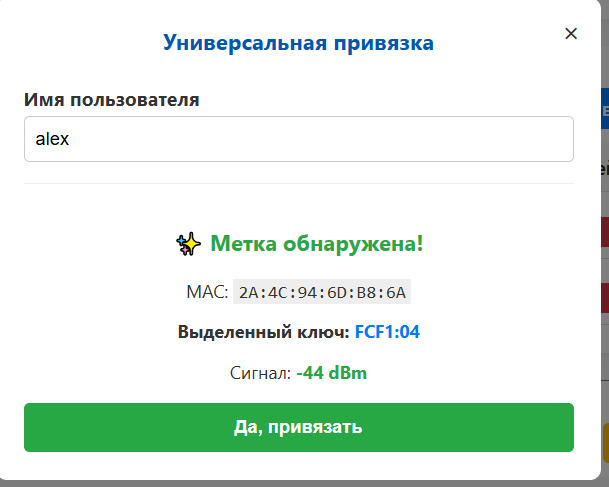
- Нажмите кнопку « Добавить метку», введите имя члена семьи (например, alex).
- Возьмите метку Hoco (или любой другой трекер), нажмите на ней физическую кнопку и положите её прямо на плату Raspberry Pi 5.
- Веб-интерфейс мгновенно поймает сильный сигнал близкого устройства, выделит его уникальный отпечаток (например, FEAA:41) и выведет кнопку «Да, привязать». Нажмите её.
Шаг 5. Обработка данных в MajorDoMo
Скрипт будет автоматически отправлять JSON-сообщения со статусом присутствия в ваш MQTT-брокер.
Пример топика: majordomo/status/alex
Присутствует дома: {"status": "home", "value": 1}
Ушел (сигнал пропал): {"status": "away", "value": 0}
Вам достаточно зайти в модуль MQTT в панели MajorDoMo, подписаться на этот топик и связать переменную value с методом или свойством объекта пользователя:
// Пример PHP кода на методе свойства в MajorDoMo:
if ($params['NEW_VALUE'] == 1) {
    sg('User_Alex.isHome', 1);
    clearTimeOut('Alex_Gone_Timer');
    say("Алекс пришёл домой!", 2);
} else {
    sg('User_Alex.isHome', 0);
    say("Алекс ушёл.", 2);
}
Порог дальности обнаружения можно регулировать прямо через веб-интерфейс параметром Порог RSSI (dBm) (например, выставив -90 для ловли по всей квартире, или -65 для срабатывания строго у входной двери).
Удачных вам интеграций и стабильного Умного Дома! Модуль работает безупречно и годами бережет батарейки ваших трекеров.
PS: Данный блог и код полностью создан при поддержке Google ИИ!
